
On managed shared hosting, the hosting provider controls the server configuration.
They decide which TLS versions to support, how security headers are applied, when software gets patched, and what you’re allowed to change. On a dedicated server, you do. That distinction doesn’t matter much when everything is running fine. It matters a great deal when a security audit, a vendor risk review, or a SecurityScorecard report flags specific issues your current environment won’t let you address.The honest answer to that question is: it depends on who owns the server.
This article explains exactly what security configuration decisions live at the server level, why managed hosting environments limit your access to them, and what actually changes when you move to a dedicated server with root access.
What Does “Managed” Mean for Security?
Managed hosting is a tradeoff, not a flaw. The provider handles the infrastructure so you can focus on your site. That includes server setup, software updates, hardware maintenance, and yes, security configuration. The result is a faster path to a running site, with less technical overhead.
The tradeoff is that “managed” also means “configured by someone else.” The web server, the operating system, the firewall, the TLS stack — those components are configured according to the provider’s standards, not yours. Their standards are set once, applied broadly across a shared environment serving many customers, and updated on the provider’s timeline.
That works well for the vast majority of hosting needs. For businesses that need to meet specific security benchmarks, satisfy enterprise procurement requirements, or fix findings on an external security rating, it creates a ceiling that’s difficult to work around without changing hosting environments.
What Security Decisions Live at the Server Level?
Several security configurations exist entirely outside your application code and outside your content management system. They’re set in the web server software — Apache, cPanel, Nginx, or LiteSpeed — and in the operating system configuration. The WordPress admin panel, cPanel file manager, and even FTP access don’t touch them.
TLS protocol versions. Whether your server accepts TLS 1.0, 1.1, 1.2, or 1.3 connections is controlled in the web server’s SSL configuration file. TLS 1.0 and 1.1 were deprecated by the IETF in 2021 due to known cryptographic vulnerabilities. Whether they remain enabled on your site depends entirely on what the server is configured to accept.
Cipher suites. Which encryption algorithms your server advertises during the TLS handshake is a separate, adjacent configuration. Weak cipher suites — those using RC4, 3DES, or export-grade key lengths — appear as distinct findings on security scoring platforms even when you’ve upgraded TLS versions. Removing them requires editing the same server-level configuration.
HTTP security headers. Headers like HTTP Strict Transport Security (HSTS), Content Security Policy (CSP), X-Content-Type-Options, and X-Frame-Options are sent by the web server with every HTTP response. Adding them reliably requires either a directive in the web server’s virtual host configuration or an .htaccess rule on Apache servers. The web server sends them before the application layer ever processes the request.
Certificate configuration. The signature algorithm, revocation support (OCSP stapling), and deployment options for a TLS certificate are set when the certificate is installed and configured on the server. An application plugin can’t change these after the fact.
Software patching cadence. Which version of PHP, OpenSSL, and the Linux kernel is running on the server is determined by whoever manages package updates. How quickly a critical CVE gets patched — versus how quickly it appears in a scan — depends on that person’s schedule and authority.
What Security Settings Does Managed Hosting Control on Your Behalf?
Managed WordPress hosts handle security well within their model. WP Engine, for example, provides a managed firewall that blocks common attacks, automated plugin updates, and around-the-clock monitoring with rapid response to threats and malware. These protections are real, and for many sites they’re sufficient.
The constraint is that the security decisions are the provider’s to make, not the customer’s.
WP Engine closely manages certain settings in order to protect server performance or for security purposes. Their platform documentation lists a set of configurations that customers cannot change independently. Some require submitting a support request with no guaranteed timeline. Revisions in WordPress, for example, cannot be enabled in the wp-config.php or php.ini files, because those settings will be overwritten at the server level.
On TLS, WP Engine has deprecated TLS 1.0 and 1.1 across the platform, and customers don’t have the option to defer or opt into a version lower than TLS 1.2. That’s good security practice, and it resolves those specific findings. But the inverse is also true: customers cannot push beyond the platform’s TLS defaults, cannot select specific cipher suite configurations, and cannot make certificate deployment decisions that differ from what the platform provides.
For HTTP security headers, the situation requires careful reading. Adding security headers from within WordPress — through a plugin or a custom functions.php entry — is possible, but it’s application-layer delivery. A security scanner checking what the server sends at the network level may not see these headers the same way as headers set in the web server configuration. HTTP security headers work best when they are set at the web server level, which means your hosting account. On a managed platform, whether those headers get set at the server level, or how the CDN layer between the customer and the origin server handles them, is the provider’s decision. On WP Engine’s Advanced Network, traffic routes through Cloudflare at the DNS level. What headers Cloudflare passes, strips, or modifies in transit depends on how WP Engine has configured that integration, not on what you put in an .htaccess file.
Why Is Content Security Policy So Difficult to Fix on Managed Hosting?
Content Security Policy is the most commonly flagged missing header in external security audits. CSP tells the browser exactly which sources of scripts, styles, images, and other assets are permitted to load on your pages. A missing CSP is a reliable finding on SecurityScorecard, SecurityHeaders.io, and most PCI compliance scans.
Implementing CSP correctly requires two things: a defined policy tailored to your site’s specific resource dependencies, and reliable delivery of that policy header with every response. The second part is the problem in managed environments.
On an Apache server, you can add a CSP directly to your .htaccess file, which applies the policy site-wide and is more secure than using meta tags. On an Nginx server, you add it to the server block in the virtual host configuration. Both methods require the ability to write to and reload server configuration files. On a managed WordPress platform, those files belong to the provider.
Plugins can inject CSP headers via PHP’s header() function, but this creates several failure modes: caching layers may suppress or override PHP-generated headers, CDN edge nodes may not propagate them consistently, and any CDN configuration change by the provider can silently break delivery. Environments where you’re unable to access raw server files via cPanel, FTP, or SSH require using a plugin approach, which carries more implementation risk.
The result is a situation where you can do the work to implement a CSP, confirm it’s “working” in your browser, submit a support ticket requesting server-level configuration, and still have the header appear inconsistently in an automated scan.
How Does a Dedicated Server Change Your Security Configuration Options?
Root access means you own the configuration. Every security decision described above becomes a configuration file you can edit, reload, and verify.
Disabling TLS 1.0 and 1.1 on an Apache server requires one line in the SSL configuration and a service reload. Adding cipher suite restrictions — removing RC4, 3DES, and export grades — takes about five additional lines. These changes take effect immediately and can be verified with tools like openssl s_client or Qualys SSL Labs before and after.
Adding HSTS to every response is a single directive in the virtual host block:
CSP is configured the same way, applied to every response from the origin, not relayed through an application plugin. X-Content-Type-Options, X-Frame-Options, and Referrer-Policy are three additional lines.
Certificate configuration — OCSP stapling for revocation support, choosing a signing algorithm, setting deployment options — is handled at provisioning time and can be updated at any time without contacting a provider.
Patching cadence is yours to control, with one important caveat: on an unmanaged server, it’s also your responsibility. On InMotion Hosting’s Managed Dedicated Servers, InMotion handles the server-level software and infrastructure, while customers retain root access to make their own security configuration changes.
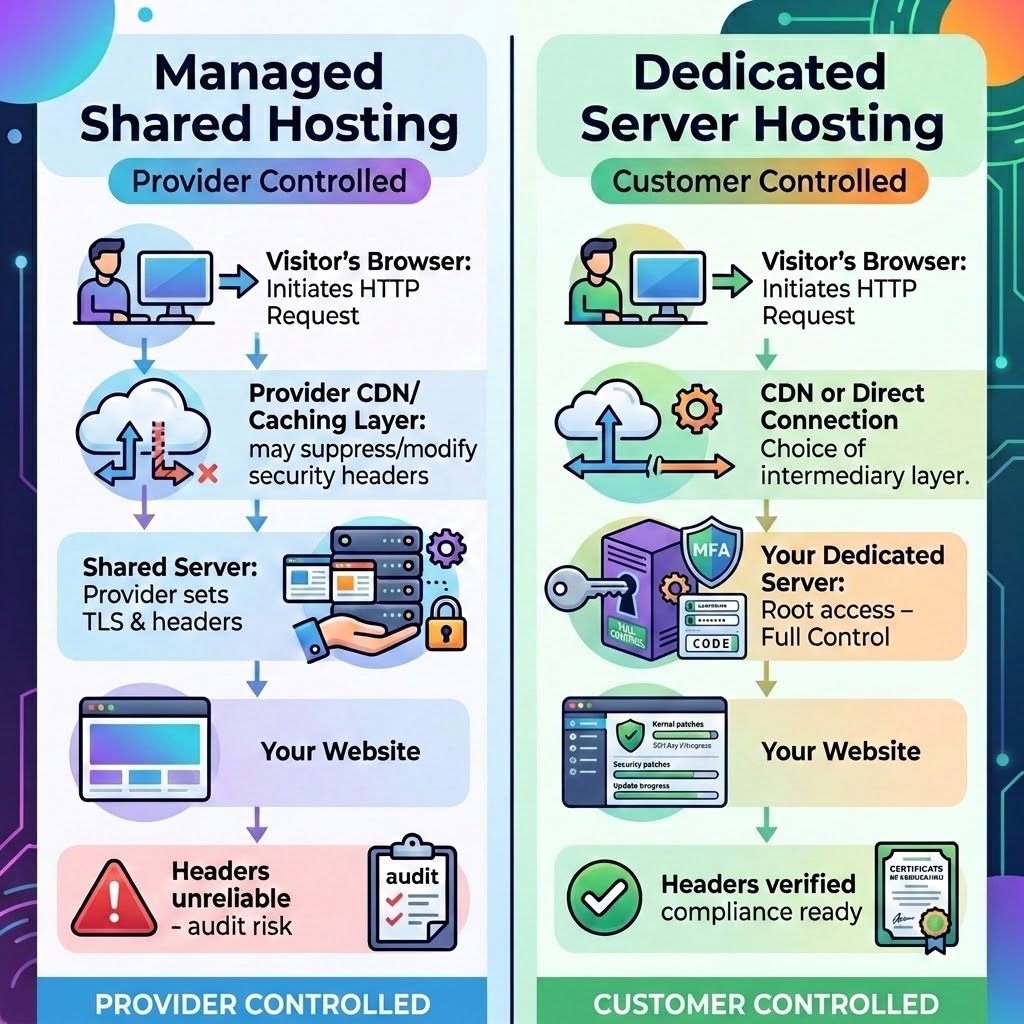
Dedicated Server vs. Managed Shared Hosting: Which Security Settings Can You Control?
Let’s compare what each environment allows.
The right column doesn’t mean “no support.” It means the decisions are yours, with expert help available when needed.
Does Your Provider’s Security Certification Cover Your Specific Requirements?
This is the nuance that often gets lost in comparison articles. Managed platforms like WP Engine have legitimate, serious security practices. WP Engine holds SOC 2 Type II and ISO 27001:2022 certifications, and limits disk write access at the process level to harden the environment against malware injection via vulnerable themes or plugins.
Those certifications reflect the provider’s security posture. They document how the provider protects the shared infrastructure. What they don’t address is whether your organization’s external attack surface — the IP addresses, domain names, and servers associated with your business — meets the specific security configuration requirements of your clients, auditors, or security scoring platforms.
An enterprise client running a vendor risk program checks your SecurityScorecard rating, not your provider’s SOC 2 report. A PCI QSA assessing your environment reviews the TLS configuration on the server where cardholder data transmits, not the host’s general compliance certification. Those are your configurations to control.
Who Actually Needs a Dedicated Server for Security Reasons?
Not every website does. Managed Shared Hosting is appropriate, and secure enough, for sites that don’t face external security auditing requirements and aren’t processing sensitive data under compliance frameworks.
A dedicated server makes sense when:
Your SecurityScorecard or similar security rating shows configuration findings that require server-level access to fix
An enterprise client or procurement team is requesting documentation of your specific security configurations — not just a provider’s certification
You’re working toward PCI DSS compliance and need to control the TLS configuration, network segmentation, and patching schedule on the server that processes transactions
Your organization has undergone a penetration test or security assessment that flagged server-level findings
You manage multiple client sites and are accountable for the security posture of each one
Agencies carrying security liability for client sites — whether contractually or just reputationally — routinely discover that shared managed environments put security decisions outside their control at exactly the moments those decisions matter most.
“On managed shared hosting, the hosting provider controls the server configuration. On a dedicated server with the Professional Services offered by InMotion Solutions SysAdmin team, you do.” — Parag Parikh, InMotion Solutions Manager
What Should You Clarify Before Switching to a Dedicated Server?
Moving to a dedicated server is a meaningful infrastructure decision. Before making that move, clarify a few things:
Which specific findings need to be fixed? Not all SecurityScorecard findings require a dedicated server. Some are fixable via CDN configuration, DNS updates, or SSL provider changes. Identify which findings specifically require server-level configuration access.
Who will manage the server configuration? Root access creates responsibility. If you don’t have in-house sysadmin capacity, factor in the cost of managed support or professional services.
What does your compliance requirement actually specify? PCI DSS, SOC 2, and HIPAA each have specific scope definitions. Confirm that the server configuration change you need is within scope and will satisfy the audit requirement.
InMotion Hosting’s Dedicated Servers include full root access and cPanel/WHM control, with managed infrastructure support from the InMotion team. The Premier Care Bundle adds Monarx malware defense, 500GB of backup storage, and monthly time with InMotion Solutions — the in-house sysadmin team available for security hardening, TLS configuration, and compliance-oriented server setup. Explore Dedicated Server plans or contact our team to talk through your specific security requirements.
All VPS or Dedicated Servers can be made PCI-DSS compliant with our help for clients that work with us and their PCI certification organization.